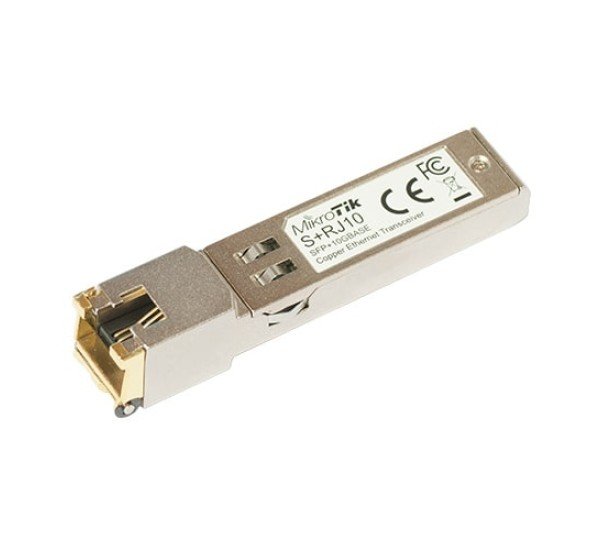
About MikroTik S+RJ10 10G SFP+ RJ45 Module in Bangladesh
The MikroTik S+RJ10 is a high-speed RJ45 copper SFP+ transceiver module designed to add 10 Gigabit Ethernet connectivity to compatible SFP+ ports. Based on the Marvell 88X3310P transceiver, it supports multiple Ethernet speeds from 10Mbps through 10Gbps, allowing compatible MikroTik networking equipment to connect directly to copper Ethernet infrastructure without requiring optical fiber.
The S+RJ10 supports 10BASE-T, 100BASE-T, 1000BASE-T, 2.5GBASE-T, 5GBASE-T and 10GBASE-T connectivity. For 10Gbps operation, MikroTik specifies Cat6 or Cat7 cabling with a maximum supported distance of 30 meters. At lower speeds, supported distances can reach up to 100 meters depending on the negotiated speed and cable type. :contentReference[oaicite:1]{index=1}
MikroTik S+RJ10 10G SFP+ RJ45 Module Specifications & Features
| Specification | Details |
|---|
| Brand | MikroTik |
| Model | S+RJ10 |
| Module Type | RJ45 SFP+ Copper Module |
| Maximum Speed | 10Gbps |
| Supported Speeds | 10Mbps / 100Mbps / 1Gbps / 2.5Gbps / 5Gbps / 10Gbps |
| 10G Standard | 10GBASE-T |
| Connector | RJ45 |
| Interface | SFP+ |
| Chipset | Marvell 88X3310P |
| 10G Cable | Cat6 / Cat7 |
| Maximum 10G Distance | 30m |
| Maximum Lower-Speed Distance | Up to 100m, depending on speed and cable |
Overview
The MikroTik S+RJ10 provides a practical way to connect an SFP+ networking interface to standard RJ45 copper Ethernet cabling. Instead of deploying an optical transceiver and fiber connection, the S+RJ10 allows compatible SFP+ equipment to communicate over twisted-pair copper.
MikroTik identifies the S+RJ10 as a unique six-speed RJ45 module capable of negotiating between 10Mbps, 100Mbps, 1Gbps, 2.5Gbps, 5Gbps and 10Gbps depending on the connected equipment and cable. :contentReference[oaicite:2]{index=2}
Buy MikroTik S+RJ10 10G SFP+ RJ45 Module in Bangladesh
Buy the MikroTik S+RJ10 10G SFP+ RJ45 Copper Module from Datacom Technologies (BD). It is an ideal networking accessory for organizations upgrading compatible MikroTik SFP+ interfaces to high-speed copper Ethernet connectivity.
Datacom Technologies (BD) supplies MikroTik networking products, SFP/SFP+ modules, switches, routers and enterprise network equipment in Bangladesh with competitive pricing and technical support.
Key Features
- Up to 10Gbps Ethernet connectivity
- RJ45 copper interface
- SFP+ form factor
- Supports 10/100Mbps, 1G, 2.5G, 5G and 10G Ethernet
- Supports 10GBASE-T
- Based on Marvell 88X3310P
- Uses standard twisted-pair Ethernet cabling
- Up to 30m at 10Gbps
- Up to 100m at lower supported speeds
- Ideal for compatible MikroTik SFP+ equipment
- Useful for copper-to-SFP+ network upgrades
10 Gigabit Ethernet Connectivity
The S+RJ10 enables compatible SFP+ ports to operate over 10GBASE-T copper Ethernet. This can simplify network deployments where existing structured copper cabling is preferred over optical fiber.
For 10Gbps operation, MikroTik specifies Cat6 or Cat7 cable with a maximum supported distance of 30 meters. Actual link performance depends on cable quality, length and the connected equipment. :contentReference[oaicite:3]{index=3}
Multi-Speed Ethernet Support
One of the key advantages of the S+RJ10 is its multi-speed capability. The module can negotiate at different Ethernet rates rather than being limited exclusively to 10Gbps.
| Ethernet Speed | Recommended Cable | Maximum Distance |
|---|
| 10Mbps | Cat5e/6 | 100m |
| 100Mbps | Cat5e/6 | 100m |
| 1Gbps | Cat5e/6 | 100m |
| 2.5Gbps | Cat5e/6 | 100m |
| 5Gbps | Cat5e/6 | 100m |
| 10Gbps | Cat6/7 | 30m |
MikroTik notes that negotiated speed is highly dependent on the quality and length of the cable. :contentReference[oaicite:4]{index=4}
RJ45 Copper Connectivity
The S+RJ10 uses an RJ45 Ethernet connector, making it suitable for environments that already use copper Ethernet cabling.
This can be especially useful when connecting a MikroTik SFP+ switch or router to a server, workstation, firewall or network switch equipped with a compatible copper Ethernet interface.
SFP+ Compatibility
The S+RJ10 is designed specifically for SFP+ ports. MikroTik documentation states that the module can be used in compatible MikroTik devices with SFP+ interfaces. :contentReference[oaicite:5]{index=5}
Compatibility should nevertheless be checked against the exact MikroTik model. MikroTik maintains a current wired-interface compatibility table showing S+RJ10 support across its networking products. :contentReference[oaicite:6]{index=6}
Marvell 88X3310P Transceiver
The S+RJ10 is based on the Marvell 88X3310P transceiver. This platform enables the module's multi-rate copper Ethernet functionality. :contentReference[oaicite:7]{index=7}
10GBASE-T over Cat6/Cat7
For 10Gbps operation, the S+RJ10 uses 10GBASE-T over twisted-pair copper. MikroTik specifies Cat6 or Cat7 cabling and a maximum 10G link distance of 30 meters. :contentReference[oaicite:8]{index=8}
For longer cable runs, the connection may negotiate to a lower supported speed depending on the cable installation and connected devices.
Use with MikroTik Switches and Routers
The S+RJ10 can be used with compatible MikroTik routers and switches equipped with SFP+ interfaces. MikroTik's compatibility documentation lists S+RJ10 support for numerous CCR, CRS and other networking platforms. :contentReference[oaicite:9]{index=9}
Examples of MikroTik equipment documented with S+RJ10 support include the CCR1072-1G-8S+, CCR1036 series, CCR1009 series, CRS317-1G-16S+RM, CRS326 series and other compatible models. :contentReference[oaicite:10]{index=10}
Network Upgrade Applications
The S+RJ10 is useful when an organization wants to upgrade an existing SFP+ interface to copper Ethernet without replacing the network device.
- 10GbE server connectivity
- Data center switch connections
- Server-to-switch uplinks
- Network aggregation
- Storage network connectivity
- High-speed workstation networking
- Router-to-switch connections
- Copper-based 10GbE deployments
Thermal Considerations
The S+RJ10 consumes more power and generates more heat than many optical SFP+ modules. MikroTik's current guidance specifies average power consumption of approximately 2.7W for 10GBASE-T at a 30m link and notes that the transceiver itself can reach temperatures of up to 90°C. :contentReference[oaicite:11]{index=11}
MikroTik recommends avoiding placing S+RJ10 modules directly beside one another in high-density SFP+ cages. Where multiple modules are required, optical modules or unused ports should be placed between them when possible to improve thermal conditions. :contentReference[oaicite:12]{index=12}
When using S+RJ10 modules in passively cooled devices, additional airflow or lower ambient temperature may be required. :contentReference[oaicite:13]{index=13}
S+RJ10 to S+RJ10 Connections
Two S+RJ10 modules can be connected directly over compatible copper Ethernet cabling. MikroTik states that S+RJ10-to-S+RJ10 connections negotiate to the highest possible rate supported by the link. :contentReference[oaicite:14]{index=14}
Compatibility Considerations
- Use only in compatible SFP+ ports
- Verify the exact MikroTik device compatibility
- Use suitable Cat6/Cat7 cable for 10Gbps
- Keep 10G copper runs within the supported 30m distance
- Consider module heat generation in high-density installations
- Avoid placing multiple S+RJ10 modules directly beside each other where possible
- Provide additional cooling when required
Latest S+RJ10 Revision
MikroTik's current compatibility documentation notes that the latest revision of the S+RJ10 has /r2 at the end of the serial number. The revision adds jumbo-frame support up to 10218 bytes at 2.5G, 5G and 10G speeds, actual link-speed reporting and DDM monitoring for supply voltage and module temperature. :contentReference[oaicite:15]{index=15}
If these features are important to your deployment, verify the exact hardware revision before purchasing.
Benefits
- Up to 10Gbps copper Ethernet
- Works with standard RJ45 cabling
- Multi-rate 10M/100M/1G/2.5G/5G/10G support
- Convenient SFP+ to RJ45 conversion
- Supports 10GBASE-T
- Useful for existing copper infrastructure
- Suitable for compatible MikroTik routers and switches
- Ideal for server and data center connectivity
Why Buy from Datacom Technologies (BD)?
Datacom Technologies (BD) supplies MikroTik networking equipment, SFP/SFP+ transceivers, switches, routers and enterprise networking products in Bangladesh. Customers can receive competitive pricing, technical consultation and deployment support.
- Call/WhatsApp: +8801748173213
- Email: sales@datacom.com.bd
- Alternative Email: datacomtechnologiesbd@gmail.com
- Office: Tropical Center, 218, Dr. Kudroti Khuda Road, New Elephant Road, Dhaka-1205, Bangladesh
Frequently Asked Questions (FAQ)
Q1: What is the MikroTik S+RJ10?
The MikroTik S+RJ10 is a multi-speed RJ45 copper SFP+ module supporting Ethernet speeds up to 10Gbps.
Q2: What is the maximum speed of S+RJ10?
The maximum supported speed is 10Gbps using 10GBASE-T.
Q3: Which Ethernet speeds does S+RJ10 support?
It supports 10Mbps, 100Mbps, 1Gbps, 2.5Gbps, 5Gbps and 10Gbps. :contentReference[oaicite:16]{index=16}
Q4: What connector does S+RJ10 use?
It uses a standard RJ45 copper Ethernet connector.
Q5: What cable is required for 10Gbps?
MikroTik specifies Cat6 or Cat7 cable for 10GBASE-T operation.
Q6: What is the maximum 10Gbps distance?
The specified maximum distance for 10GBASE-T is 30 meters. :contentReference[oaicite:17]{index=17}
Q7: Can S+RJ10 operate at 1Gbps?
Yes. It supports 1000BASE-T and can negotiate lower speeds according to the connected equipment and cable.
Q8: Can S+RJ10 operate at 2.5Gbps and 5Gbps?
Yes. The module supports 2.5GBASE-T and 5GBASE-T in addition to 10GBASE-T. :contentReference[oaicite:18]{index=18}
Q9: Can S+RJ10 be used in an SFP port?
No. MikroTik specifies that the S+RJ10 is intended for SFP+ ports.
Q10: What chipset does S+RJ10 use?
The S+RJ10 is based on the Marvell 88X3310P transceiver. :contentReference[oaicite:19]{index=19}
Q11: Does S+RJ10 generate significant heat?
Yes. MikroTik notes that the module has relatively high power consumption and can become hot, particularly when multiple S+RJ10 modules are installed beside one another. :contentReference[oaicite:20]{index=20}
Q12: Can multiple S+RJ10 modules be installed together?
They can be supported depending on the MikroTik device, but MikroTik recommends avoiding adjacent placement because of heat generation. The maximum supported number varies by device. :contentReference[oaicite:21]{index=21}
Q13: Can S+RJ10 connect to another S+RJ10?
Yes. MikroTik states that S+RJ10-to-S+RJ10 links negotiate to the highest possible rate supported by the connection. :contentReference[oaicite:22]{index=22}
Q14: What is the latest S+RJ10 revision?
MikroTik's current documentation identifies the latest revision by /r2 at the end of the serial number and lists improvements including DDM monitoring and jumbo frames at 2.5G, 5G and 10G speeds. :contentReference[oaicite:23]{index=23}
Q15: Where can I buy MikroTik S+RJ10 in Bangladesh?
You can contact Datacom Technologies (BD) for MikroTik S+RJ10 modules, SFP/SFP+ transceivers, switches, routers and enterprise networking equipment.
-750x250.png "Datacom Technologies (BD)")