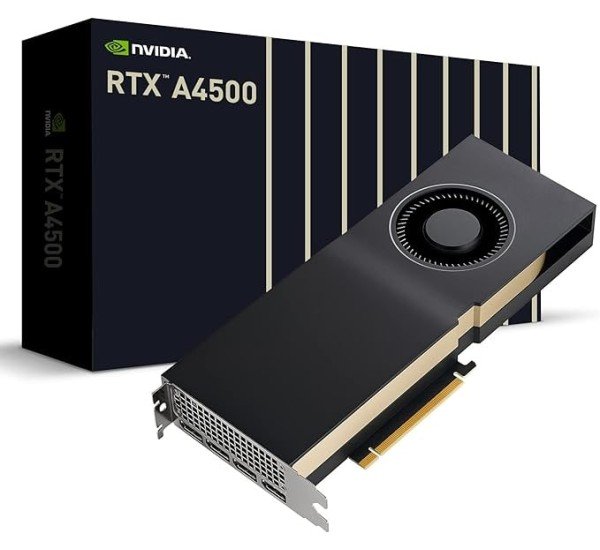
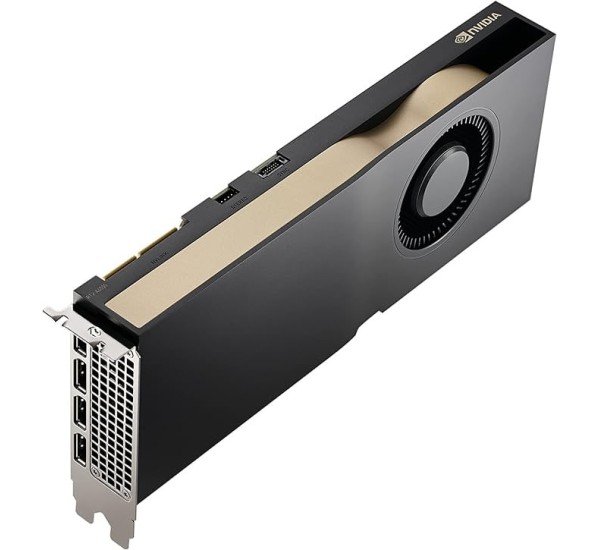
NVIDIA RTX A4500 Graphics Card
Unlock powerful performance with the NVIDIA RTX A4500 graphics card, featuring 7168 CUDA cores, 20GB GDDR6 memory, and 2nd Gen Ray Tracing cores for ultra-realistic visuals. With a 320-bit interface and 640 GB/s bandwidth, it’s built for demanding professional workloads and multi-display setups. Ideal for creators and engineers, this Ampere-based GPU supports PCIe Gen 4.0 and VR-ready experiences.
Specification
| Specification |
Details |
| GPU Architecture |
Ampere |
| CUDA Cores |
7168 |
| Base Clock |
1050 MHz |
| Boost Clock |
1710 MHz |
| Memory Size |
20 GB GDDR6 |
| Memory Interface |
320-bit |
| Memory Bandwidth |
640 GB/s |
| TDP (Thermal Design Power) |
200 W |
| Power Connectors |
1x 8-pin PCIe |
| Display Outputs |
4x DisplayPort 1.4a |
| VR Ready |
Yes |
| PCI Express Gen 4.0 |
Yes |
| Ray Tracing Cores |
Yes (2nd Gen) |
| Tensor Cores |
Yes (3rd Gen) |
| Multi-Display Support |
Yes (4 displays) |
| Form Factor |
2-slot |
| Cooling |
Active (Dual-fan) |
Description
The
NVIDIA RTX A4500 is a high-performance graphics card designed for professional workstations and demanding workloads. Built on the powerful Ampere architecture, it features 7168 CUDA cores, enabling excellent parallel processing capabilities ideal for tasks such as 3D rendering, simulations, and AI training. With 20 GB of GDDR6 memory and a 320-bit memory interface, the A4500 delivers impressive memory bandwidth of 640 GB/s, allowing it to handle complex datasets with ease.
The RTX A4500 supports hardware-accelerated ray tracing and AI-driven tasks with its second-generation Ray Tracing Cores and third-generation Tensor Cores. These features enhance real-time rendering and artificial intelligence capabilities, making it an ideal choice for professionals working in fields like architecture, automotive design, and media production.
This card is also VR-ready, enabling immersive virtual reality experiences, and supports multi-display setups with up to four monitors. Its 200W power draw is efficient for the level of performance it delivers, and the dual-fan cooling system ensures it stays within optimal thermal limits during demanding tasks. The RTX A4500 is engineered for reliability and versatility, meeting the needs of professionals who require cutting-edge graphics performance.
Key Features:
- CUDA Cores: 7,680 CUDA cores for fast parallel processing, ideal for rendering, simulations, and other computational tasks.
- GPU Memory: 20 GB of GDDR6 memory, providing ample bandwidth for large datasets and complex workloads.
- Ray Tracing and AI: Includes hardware support for ray tracing and AI-based workflows, making it suitable for professional graphics, VR, and AI development.
- Multi-Display Support: Capable of supporting up to four 4K displays simultaneously, ideal for complex visualization setups.
- Turing Architecture: Built on the NVIDIA Turing architecture, it offers higher performance and efficiency compared to previous-generation cards.
- NVLink Support: Supports NVIDIA NVLink for multi-GPU setups to scale performance even further in demanding applications.
- Certified Drivers: Comes with certified drivers for professional applications like CAD, DCC, and AI development tools.
Where it Can Be Used:
- Workstations: Perfect for high-end workstations used for 3D rendering, AI training, scientific computing, and deep learning.
- CAD and DCC Applications: Ideal for professionals in architecture, engineering, and media industries using programs like AutoCAD, SolidWorks, and Autodesk Maya.
- Virtualization: Suitable for virtualized environments requiring strong GPU performance for virtual desktops or GPU pass-through.
- AI and Machine Learning: With its CUDA cores and Tensor cores, it excels at parallel computation tasks, deep learning model training, and inference.
Installation Steps:
- Prepare Your Workstation: Ensure that your workstation has a PCIe x16 slot available, sufficient power supply (the RTX A4500 requires around 200W), and adequate cooling.
- Turn Off Your Computer: Unplug the power supply and press the power button to discharge any residual power.
- Insert the RTX A4500: Carefully insert the card into the PCIe x16 slot on the motherboard, ensuring it clicks securely into place.
- Connect Power Cables: Attach the necessary power cables (6-pin or 8-pin) from your PSU to the graphics card.
- Install Drivers: Boot up the computer, then install the latest NVIDIA drivers from their official website or use the ones provided with the card.
- Test the System: After installing drivers, run a GPU stress test or benchmark to ensure that the card is functioning properly.
User Experience:
- High Performance: Users experience smooth, fast rendering times in 3D modeling software and real-time graphics. The GPU is highly reliable for long sessions without significant thermal throttling.
- Quiet Operation: The card features an efficient cooling system, ensuring it remains relatively quiet even under load.
- Stable Drivers: The A4500 benefits from NVIDIA’s professional-grade drivers, ensuring stability in critical applications, especially for industries where uptime and reliability are paramount.
- Flexibility: Works well across a wide range of applications, offering both flexibility and power for creative and scientific professionals.
Buy NVIDIA RTX A4500 Graphics Card at the Best Price from Datacom BD Online
In Bangladesh, you can get
NVIDIA RTX A4500 Graphics Card From
Datacom. We have a large collection of latest
Workstation Graphics Card to purchase. Order Online Or Visit our Office to get yours at lowest price. The NVIDIA RTX A4500 Graphics comes with 1 Year warranty.
- ? Call/WhatsApp: 01748173213
- ✉ Email: sales@datacomtechbd.com | datacomtechnologiesbd@gmail.com
What is the price of NVIDIA RTX A4500 Graphics Card in Bangladesh?
The estimated price of
NVIDIA RTX A4500 in Bangladesh is 3,50,000৳. You can buy the NVIDIA RTX A4500 GPU at best price from our website or visit our Office.
For the most accurate pricing, stock availability, and warranty details, we recommend contacting us before placing your order.
-750x250.png "Datacom Technologies (BD)")